 Sayaid Muhammad
HumanBots sells website, marketing and automation services, including the 30 Day Lead Challenge mentioned in this article. Every check below can be done without hiring us.
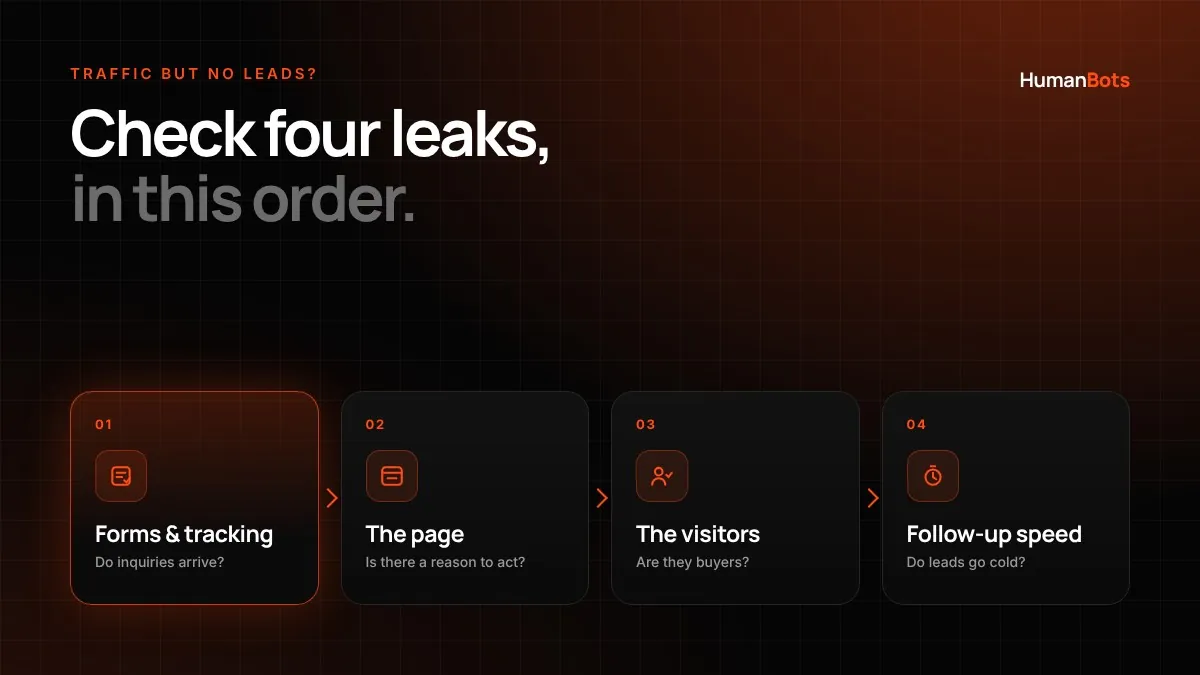
When a website gets steady traffic but almost no inquiries, the cause is usually one of four leaks: broken forms or tracking, a page that gives visitors no clear reason to act, traffic from people who were never going to buy, or leads that arrive but go cold before anyone replies. Check them in that order. The first leak takes about 10 minutes to rule out, and fixing it sometimes reveals that you had leads all along.
Check these four leaks in this order
The order matters because each leak hides the ones after it. If your contact form is silently failing, no amount of copywriting will show up in your lead count. If your tracking is broken, you can't tell whether a page change helped.
| Leak | Typical symptom | Quick test | Free tool |
|---|---|---|---|
| 1. Broken forms or tracking | Zero or near-zero inquiries, sometimes a sudden drop | Submit your own form and call your own number | Your phone, inbox, Google Analytics 4 |
| 2. No reason to act | Visitors read but don't click your call to action | Read your top page as a first-time buyer would | Google Analytics 4 Landing page report |
| 3. Wrong visitors | Traffic rising, inquiries flat | Review which searches bring people to each page | Google Search Console |
| 4. Leads go cold | Inquiries come in but rarely become customers | Inquire as a customer and time the reply | A stopwatch and a second email address |
Leak 1: your forms or tracking are broken
Rule out a broken form first, because it produces exactly this symptom and takes minutes to check. Forms fail for ordinary reasons: a plugin update, an expired email connection, a spam filter, or a CRM integration that stopped syncing.
Run this end-to-end test on your phone and on a laptop:
- Submit every form on the site with a test inquiry that says "TEST" in the message.
- Confirm the confirmation message or thank-you page appears.
- Check the inbox that should receive the inquiry, including the spam and promotions folders.
- Check that the inquiry reached your customer relationship management (CRM) system, if you use one.
- Tap every click-to-call link and confirm it dials the right number.
If any step fails, fix that before anything else. Then check your tracking. In Google Analytics 4 (GA4), a completed inquiry should be recorded as a key event, which is GA4's name for an action that matters to your business. According to Google's Analytics Help documentation (checked November 4, 2026), you mark an existing event as a key event under Admin > Data display > Events, by clicking the star next to the event. Google notes that key events only count from the moment you mark them, and standard reports can take up to 24 hours to show them.
Without an event that fires when a form is submitted, your analytics can't tell you how many leads each page produces. Set that up before you change any page, so you have a baseline to compare against.
Leak 2: your page gives visitors no clear reason to act
Once forms and tracking work, look at the pages that get the most visits. In GA4, the Landing page report (Reports > Engagement > Landing page) shows which pages people arrive on first. Open your top three as if you were a first-time buyer with no knowledge of your business.
Ask these questions about each page:
- Can a visitor tell within a few seconds what you offer, for whom, and where?
- Is there one primary next step, visible without scrolling on a phone?
- Does the page answer the questions buyers ask before they inquire, such as typical cost, timeline and what happens after they get in touch?
- Is there proof a stranger can check, such as named client work, reviews on a third-party platform, or credentials?
- Does the form ask only for what you need to reply?
For example, imagine a 12-person accounting firm whose service page says "Comprehensive financial solutions for your business" and ends with a 10-field form. A visitor who needs bookkeeping for a two-location restaurant can't tell whether the firm handles that, roughly what it costs, or how soon someone will call. Rewriting the opening to name the services and client types, adding a starting price or typical range, and cutting the form to name, email, phone and a short message addresses each of those gaps.
Change one thing at a time where you can. If you rewrite the headline, the offer and the form in the same week, you won't know which change made the difference.
Leak 3: you're attracting visitors who were never going to buy
Rising traffic with flat inquiries often means the traffic is real but the intent is wrong. A plumbing company's blog post on "how to unclog a drain" may attract thousands of people who want to fix it themselves. Those visitors are useful for brand awareness, but they rarely become emergency call-outs.
Google Search Console shows which searches bring people to each page. Open the Performance report, click the page in the Pages tab, then open the Queries tab to see the searches that page appeared for. Google defines an impression as your link being shown to a user in Search and a click as a user going from Google to your page (Search Console Help, checked November 4, 2026). Sort queries by clicks and label each one:
- Buyer queries include a service, a location, "cost", "near me", "hire" or a competitor comparison.
- Research queries include "how to", "what is", definitions and DIY problems.
If most clicks to a page come from research queries, the page isn't failing. It's doing a different job. Add a relevant next step for that reader, such as a checklist or a link to the matching service page, and put your effort into pages that rank for buyer queries.
Search Console now also has a Generative AI performance report showing how often your pages appeared in Google's AI Overviews and AI Mode. Google says it rolled out to all websites worldwide as of August 31, 2026, and it reports impressions, not clicks. If your impressions there are growing while clicks to the same pages fall, people may be getting their answer on Google without visiting. That pattern is a reason to make sure your pages give a clear reason to click through, not proof that your site has a problem.
Leak 4: leads arrive but go cold before anyone replies
If inquiries arrive but rarely turn into customers, measure how long your business takes to respond. Send an inquiry from a personal email address during business hours and again in the evening, then note how long each reply takes and whether it answers the question you asked.
Response time has been studied for years, but the most quoted research is older than many people realize. A 2007 study by James Oldroyd and InsideSales.com analyzed more than 15,000 web leads and 100,000 call attempts from six companies. It found that the odds of qualifying a lead were 21 times lower when the first call came after 30 minutes rather than within five minutes. That study was co-authored by a software vendor, used each company's own definition of a qualified lead, and didn't measure closed sales or revenue, so treat it as strong evidence that speed matters, not as a precise forecast for your business.
The practical fix is usually a four-step workflow:
- The form submission creates a record in your CRM or a shared inbox.
- The inquirer gets an immediate, useful reply that says what happens next and when.
- A named person is alerted by text or app notification.
- If nobody responds within your target time, the lead is escalated to someone else.
How to confirm the fix worked
Record a baseline before you change anything: leads per week, where they came from, and how many became sales conversations. Then make one change and compare the following four weeks against the baseline.
In our experience, four weeks is a working minimum for most small businesses, because weekly lead counts swing for reasons that have nothing to do with your website, such as holidays, seasonality and paid campaigns starting or stopping. If you get fewer than about 10 leads a month, compare over a longer period before drawing conclusions. Judge results by qualified inquiries, not just form fills, since a change that doubles spam submissions isn't an improvement.
Lead-leak scorecard
Use this checklist to score your site. Each "no" points to the leak to fix first.
| # | Check | Leak |
|---|---|---|
| 1 | Every form on the site delivered a test inquiry to the right inbox this week | 1 |
| 2 | Click-to-call links dial the correct number on mobile | 1 |
| 3 | A form submission is recorded as a key event in GA4 | 1 |
| 4 | Your top three landing pages state what you do, for whom and where in the first screen | 2 |
| 5 | Each of those pages has one primary next step visible on a phone without scrolling | 2 |
| 6 | Visitors can find a price, range or "starting at" figure | 2 |
| 7 | Each page shows proof a stranger can verify | 2 |
| 8 | Your forms ask only for what you need to reply (we suggest five fields or fewer) | 2 |
| 9 | Most clicks to your service pages come from buyer queries in Search Console | 3 |
| 10 | Research-focused pages link to a relevant next step | 3 |
| 11 | A test inquiry got a human reply within your target time | 4 |
| 12 | Inquiries get an automatic reply saying what happens next | 4 |
When to fix it yourself and when to get help
Leak 1 and leak 2 can often be fixed in-house within a week if you can edit your site and have access to your analytics. Leak 3 takes longer, because changing which searches you attract means creating or reworking content over several months. Leak 4 often needs a decision more than a tool: who owns new inquiries, and how fast they're expected to reply.
If you've worked through the scorecard and the leak is still unclear, or you have several leaks at once, an outside review can save time. The HumanBots 30 Day Lead Challenge works through the same sequence in four weekly sprints: finding the leak, fixing the offer and page, turning on demand, and automating follow-up. For a broader review of where growth is stalling, see our growth consultation services. If your site is broken or hard to edit, start with website rescue.
The takeaway
Your next step: run the leak 1 test today. It takes 10 minutes, and it decides whether the rest of this list applies.